---
title: Delete overdue forms and actions
description: "Overdue forms are piling up in the dashboard - \nHow to quickly delete them to maintain order."
---
[Skip to content](https://help.lumiformapp.com/en/knowledge/delete-overdue-forms-and-actions#main-content)
English
Show submenu for translations
![LUMIFORM-White\_TRANSPARENT.png\]](https://help.lumiformapp.com/hs-fs/hubfs/LUMIFORM-White_TRANSPARENT.png?height=40&name=LUMIFORM-White_TRANSPARENT.png)
- [Default HubSpot Blog](https://zyp-4992538.hs-sites-eu1.com/blog)
Open main navigation
Close main navigation
- [Default HubSpot Blog](https://zyp-4992538.hs-sites-eu1.com/blog)
- English
Show submenu for translations
Hey👋. How can we help you?
- There are no suggestions because the search field is empty.
1. [Help Center](https://help.lumiformapp.com/en/knowledge?hsLang=en)
2. [Inspections](https://help.lumiformapp.com/en/knowledge/inspections?hsLang=en)
# Delete overdue forms and actions
## Overdue forms are piling up in the dashboard - How to quickly delete them to maintain order.
#### In this article, you will see how to quickly and easily remove overdue forms.
---
**During busy times, users may forget to complete their tasks or mark them as finished. Over time, these tasks can accumulate, causing you to lose track. To prevent this from happening, we will show you how to easily delete them.**
---
### How to delete overdue forms and tasks in Lumiform
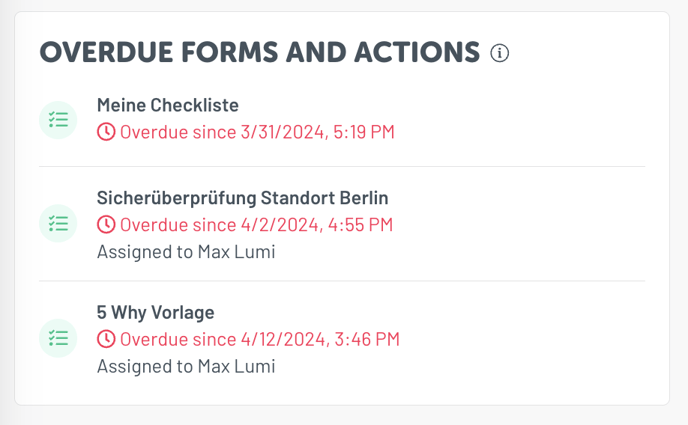
- To delete these forms, you can either click **directly on the individual forms** in the box or navigate to the [**general overview of all overdue forms**](https://admin.lumiformapp.com/forms?tab=overdue) & [**tasks**](https://admin.lumiformapp.com/issues)
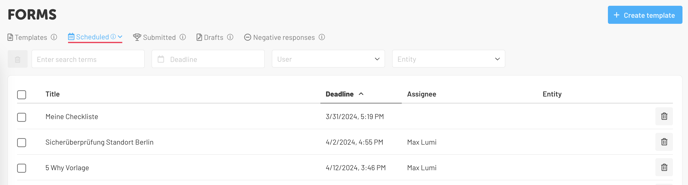
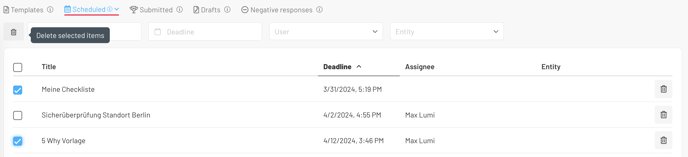
- You can delete overdue forms either individually by **clicking on the trash can icon**  on the right, or s**elect multiple forms at once** and delete them using the trash can at the top left:
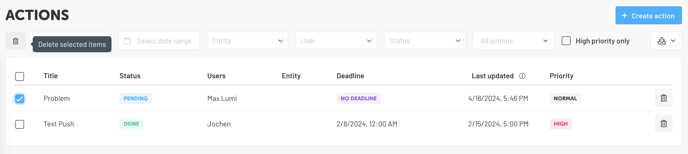
- The same applies to actions that you would like to **delete from the dashboard** as well:
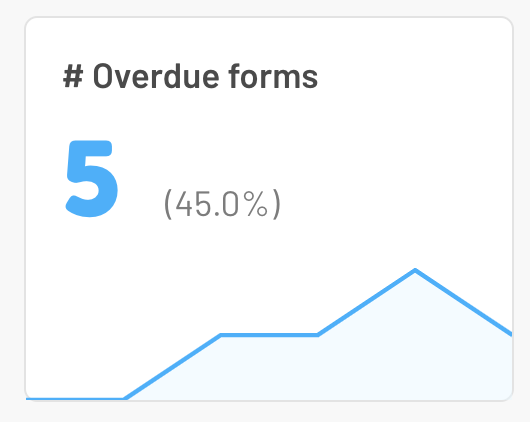
**Note**: The overdue forms in this box on the dashboard do not correspond to the
**[general overdue forms](https://admin.lumiformapp.com/forms?tab=overdue)**. These are forms that have been **completed but after the deadline**.
- [Getting started](https://help.lumiformapp.com/en/knowledge/getting-started?hsLang=en#main-content)
- [Lumiform Basics](https://help.lumiformapp.com/en/knowledge/getting-started?hsLang=en#lumiform-basics)
- [Set up Lumiform](https://help.lumiformapp.com/en/knowledge/getting-started?hsLang=en#set-up-lumiform)
- [Forms](https://help.lumiformapp.com/en/knowledge/forms?hsLang=en#main-content)
- [Configure your reports](https://help.lumiformapp.com/en/knowledge/forms?hsLang=en#configure-your-reports)
- [Troubleshoot](https://help.lumiformapp.com/en/knowledge/forms?hsLang=en#troubleshoot)
- [Inspections](https://help.lumiformapp.com/en/knowledge/inspections?hsLang=en#main-content)
- [Troubleshoot](https://help.lumiformapp.com/en/knowledge/inspections?hsLang=en#troubleshoot)
- [Actions](https://help.lumiformapp.com/en/knowledge/actions?hsLang=en#main-content)
- [Troubleshoot](https://help.lumiformapp.com/en/knowledge/actions?hsLang=en#troubleshoot)
- [Entities](https://help.lumiformapp.com/en/knowledge/entities?hsLang=en)
- [Administration](https://help.lumiformapp.com/en/knowledge/administration?hsLang=en)
- [Analytics](https://help.lumiformapp.com/en/knowledge/analytics?hsLang=en)
- [Integrations](https://help.lumiformapp.com/en/knowledge/integrations?hsLang=en#main-content)
- [Webhooks /Workflow Automation](https://help.lumiformapp.com/en/knowledge/integrations?hsLang=en#webhooks-workflow-automation)
- [Lumiform Updates](https://help.lumiformapp.com/en/knowledge/lumiform-updates?hsLang=en#main-content)
- [New features](https://help.lumiformapp.com/en/knowledge/lumiform-updates?hsLang=en#new-features)
- [Notifications](https://help.lumiformapp.com/en/knowledge/notifications?hsLang=en#main-content)
- [Troubleshoot](https://help.lumiformapp.com/en/knowledge/notifications?hsLang=en#troubleshoot)
- [Subscription](https://help.lumiformapp.com/en/knowledge/subscription?hsLang=en#main-content)
- [Troubleshoot](https://help.lumiformapp.com/en/knowledge/subscription?hsLang=en#troubleshoot)
- [Profile](https://help.lumiformapp.com/en/knowledge/profile?hsLang=en#main-content)
- [Troubleshoot](https://help.lumiformapp.com/en/knowledge/profile?hsLang=en#troubleshoot)
- [Legal](https://help.lumiformapp.com/en/knowledge/legal?hsLang=en)
- [Default HubSpot Blog](https://zyp-4992538.hs-sites-eu1.com/blog)
[](https://lumiformapp.com)
Lumiform Help Center
Copyright © 2026, Lumiform GmbH