---
title: Login not possible
description: Steps to take if you are unable to access your account.
---
[Skip to content](https://help.lumiformapp.com/en/knowledge/login-not-possible#main-content)
English
Show submenu for translations
![LUMIFORM-White\_TRANSPARENT.png\]](https://help.lumiformapp.com/hs-fs/hubfs/LUMIFORM-White_TRANSPARENT.png?height=40&name=LUMIFORM-White_TRANSPARENT.png)
- [Default HubSpot Blog](https://zyp-4992538.hs-sites-eu1.com/blog)
Open main navigation
Close main navigation
- [Default HubSpot Blog](https://zyp-4992538.hs-sites-eu1.com/blog)
- English
Show submenu for translations
Hey👋. How can we help you?
- There are no suggestions because the search field is empty.
1. [Help Center](https://help.lumiformapp.com/en/knowledge?hsLang=en)
2. [Administration](https://help.lumiformapp.com/en/knowledge/administration?hsLang=en)
# Login not possible
## Steps to take if you are unable to access your account.
#### **Having trouble logging in? Don't worry, we're here to assist you!**
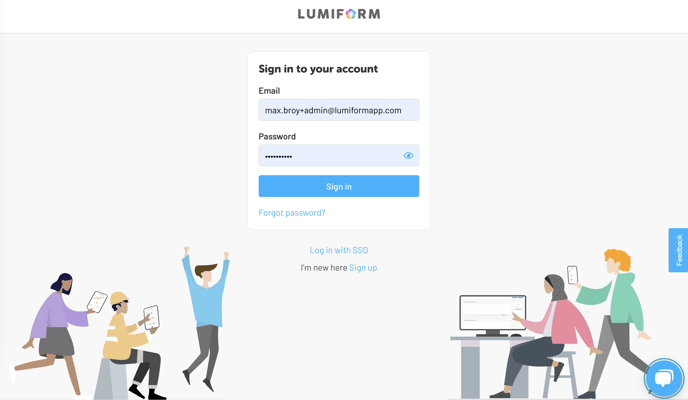
If you need to log in to carry out an inspection and your password is correct, follow these steps to regain access.
**Double-check your access credentials**: Start by verifying if you are using the correct email address. Sometimes, a typo can slip in, and the same goes for the password. To do this, simply click on the eye icon located on the right side of the password field to display it.
Forgot your password? No problem! You can easily reset it. Here's how: [**Reset Password**](https://app.hubspot.com/knowledge/4992538/edit/145310082334#:~:text=https%3A//app.hubspot.com/knowledge/4992538/edit/146597733520)
Encountering an error message? It could indicate a problem or that your account is no longer active. In such cases, reach out to us via the chat feature at the bottom right corner. Please provide your **email address** and a **screenshot of the error message**, and we will assist you promptly.
- [Getting started](https://help.lumiformapp.com/en/knowledge/getting-started?hsLang=en#main-content)
- [Lumiform Basics](https://help.lumiformapp.com/en/knowledge/getting-started?hsLang=en#lumiform-basics)
- [Set up Lumiform](https://help.lumiformapp.com/en/knowledge/getting-started?hsLang=en#set-up-lumiform)
- [Forms](https://help.lumiformapp.com/en/knowledge/forms?hsLang=en#main-content)
- [Configure your reports](https://help.lumiformapp.com/en/knowledge/forms?hsLang=en#configure-your-reports)
- [Troubleshoot](https://help.lumiformapp.com/en/knowledge/forms?hsLang=en#troubleshoot)
- [Inspections](https://help.lumiformapp.com/en/knowledge/inspections?hsLang=en#main-content)
- [Troubleshoot](https://help.lumiformapp.com/en/knowledge/inspections?hsLang=en#troubleshoot)
- [Actions](https://help.lumiformapp.com/en/knowledge/actions?hsLang=en#main-content)
- [Troubleshoot](https://help.lumiformapp.com/en/knowledge/actions?hsLang=en#troubleshoot)
- [Entities](https://help.lumiformapp.com/en/knowledge/entities?hsLang=en)
- [Administration](https://help.lumiformapp.com/en/knowledge/administration?hsLang=en)
- [Analytics](https://help.lumiformapp.com/en/knowledge/analytics?hsLang=en)
- [Integrations](https://help.lumiformapp.com/en/knowledge/integrations?hsLang=en#main-content)
- [Webhooks /Workflow Automation](https://help.lumiformapp.com/en/knowledge/integrations?hsLang=en#webhooks-workflow-automation)
- [Lumiform Updates](https://help.lumiformapp.com/en/knowledge/lumiform-updates?hsLang=en#main-content)
- [New features](https://help.lumiformapp.com/en/knowledge/lumiform-updates?hsLang=en#new-features)
- [Notifications](https://help.lumiformapp.com/en/knowledge/notifications?hsLang=en#main-content)
- [Troubleshoot](https://help.lumiformapp.com/en/knowledge/notifications?hsLang=en#troubleshoot)
- [Subscription](https://help.lumiformapp.com/en/knowledge/subscription?hsLang=en#main-content)
- [Troubleshoot](https://help.lumiformapp.com/en/knowledge/subscription?hsLang=en#troubleshoot)
- [Profile](https://help.lumiformapp.com/en/knowledge/profile?hsLang=en#main-content)
- [Troubleshoot](https://help.lumiformapp.com/en/knowledge/profile?hsLang=en#troubleshoot)
- [Legal](https://help.lumiformapp.com/en/knowledge/legal?hsLang=en)
- [Default HubSpot Blog](https://zyp-4992538.hs-sites-eu1.com/blog)
[](https://lumiformapp.com)
Lumiform Help Center
Copyright © 2026, Lumiform GmbH