![LUMIFORM-White_TRANSPARENT.png]](https://help.lumiformapp.com/hs-fs/hubfs/LUMIFORM-White_TRANSPARENT.png?height=40&name=LUMIFORM-White_TRANSPARENT.png)
What you need
- Plan requirement: This feature is available on Enterprise plans.
- Permissions: Admin permissions in Lumiform to access webhook settings.
- Third-party accounts:
- Active Make account
- Spreadsheet service connected to Make (e.g., Google Sheets, Microsoft Excel Online)
Step-by-step setup
-
Create a new scenario in Make
- Log in to make.com.
- Click “Create new scenario.”
-
Add a Webhooks module as the trigger
- Search for and add the “Webhooks” module.
- Select “Custom webhook.”
- Click “Add,” name your webhook (e.g., “Lumiform Inspections”), and copy the generated URL.
-
Register the webhook in Lumiform
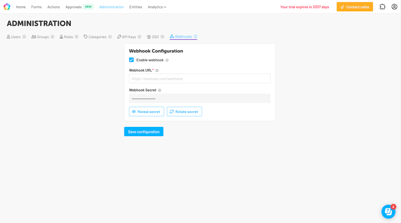
- Log in to Lumiform as an Admin.
- Go to Administration > Webhooks.
- Click “Add Webhook” and paste in your Make webhook URL.
- Select Inspection completed as the event.
- Save your changes.
-
Test the connection
-
- Trigger an inspection completion in Lumiform.
- In Make, watch for the webhook to be received and confirm you’re getting the event and record ID.
-
(Optional & recommended) Retrieve full inspection details
- Add an HTTP module in Make.
- Use the inspection record ID from the webhook payload to make a GET request to the Lumiform Public API.
- Authenticate with your API token to fetch the full inspection data.
-
Add a spreadsheet module
- Search for and add the Google Sheets or Excel Online module.
- Configure it to “Add Row” and map fields from the webhook (or API result) to the spreadsheet columns you want.
-
Test and activate your scenario
- Run a test to confirm that new inspections are logged.
- Activate the scenario for ongoing automation.
Example use cases
- Centralized reporting: Maintain an up-to-date record of all inspections in a single spreadsheet for management review.
- KPI tracking: Automatically update safety or quality KPIs based on completed forms.
- Audit readiness: Keep a live audit trail of every inspection, accessible to auditors or stakeholders at any time.
Troubleshooting: common errors and fixes
- Rows aren’t added: Double-check your workflow is active, the webhook is enabled in Lumiform, and the Make scenario has the correct event trigger.
- Only record ID is recorded: Remember, Lumiform webhooks send only the event type and record ID. Add an HTTP step to fetch full inspection details via the Public API if detailed data is needed.
- Spreadsheet module errors: Make sure the spreadsheet is shared with Make, is accessible, and any necessary authentication is correctly set up.